
The CRM that answers you in Telegram
Bookings, passes, attendance and money of your center — in order. Inside: an electronic gradebook, a parent portal and team chat, while the AI assistant answers questions and creates tasks itself. No rollout projects.
14-day free trial · No credit card · Built for teams from 1 person
Today in Deskly
Studio workspace
Clients today
0
+2 new
Bookings
0
today
Tasks
0
3 urgent
Payments
0
today
Upcoming bookings
Overdue tasks
Call the new lead
Check payment
Send schedule
Activity feed
Maria added a payment
Ivan completed a task
/ask How much did we make this week?
A real assistant reply in Telegram
Why you can trust Deskly
When everything lives in chats and spreadsheets, business loses control
Leads arrive in messengers, bookings are tracked in spreadsheets, tasks get buried in conversations, and reports are collected manually.
Leads and clients get lost
Tasks are forgotten
Bookings are hard to control
Payments are reconciled manually
Reports are collected at the end of the day
Owners do not see the real picture
Telegram-first
See your business from your pocket
Deskly sends a daily digest, reminds about renewals, answers questions about revenue and clients — and creates tasks on command. Right in Telegram.
- Morning digest of the day
- Renewal and debt reminders
- /ask answers and actions on command
Deskly Assistant
online
Built for class-based business
Passes → Lessons → Attendance → Renewals
The cycle your center lives on — Deskly runs it automatically.
Passes
Templates for 4/8/16 lessons, freezing and validity periods.
Lessons
Groups with schedules — the calendar fills itself weeks ahead.
Attendance
Mark a visit and it is deducted from the pass automatically.
Renewals
1 lesson left? The admin gets a task, the owner gets a Telegram message.
Solution
Deskly brings daily operations into one workspace
Instead of scattered chats, notes, and spreadsheets, your team gets one workspace for clients, bookings, tasks, payments, and reports.
Clients
Keep client records, statuses, notes, and activity history in one place.
Bookings
Schedule lessons, consultations, services, and trial visits with responsible team members.
Tasks
Assign work, control deadlines, and see overdue tasks before they become problems.
Payments and reports
Track payments and understand daily, weekly, and monthly performance.
Product
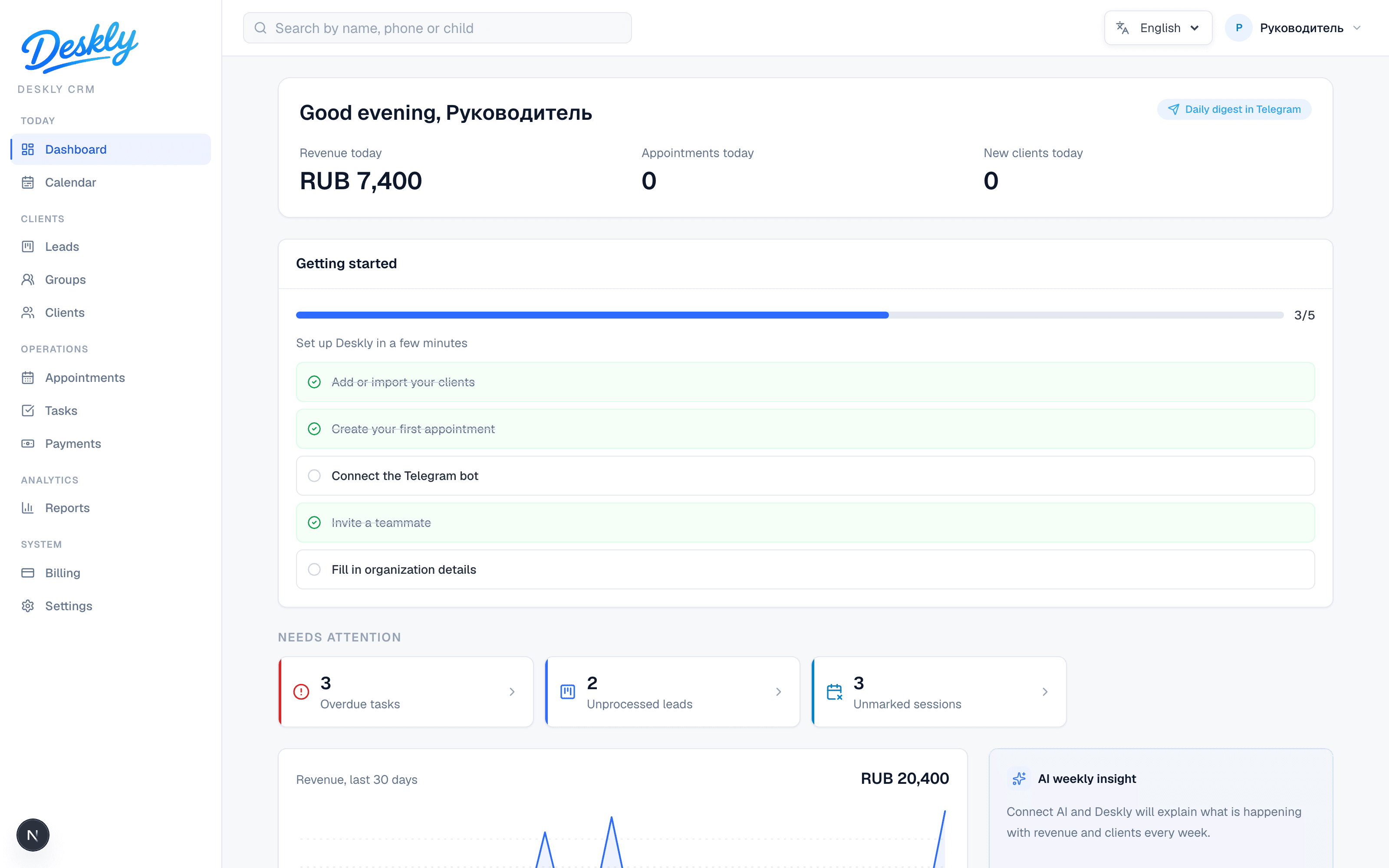
The working day is visible in one screen
Deskly keeps clients, bookings, tasks, payments, and team activity side by side, so admins stop jumping between spreadsheets and owners quickly see where help is needed.
Everything you need for daily work
No heavy corporate modules. Just the tools admins, team members, and owners need every day.
Client database
Contacts, statuses, notes, and history without scattered files.
Bookings and meetings
Plan lessons, consultations, services, and trial visits.
Tasks and deadlines
Owners, due dates, overdue work, and a clear daily list.
Payments
Track payments and reconcile revenue by client.
Reports
Daily, weekly, and monthly visibility for owners.
AI assistant with actions
Ask about bookings and clients — and ask it to create a task or add a client. The assistant does it, with confirmation.
Team chat
Staff communicate inside the CRM — no lost context in third-party messengers.
Electronic gradebook
Attendance and grades in one grid: mark the lesson and it's all there. For schools and centers.
Parent portal
Parents see the schedule, attendance, grades and pass balance — and message the center.
Referral program
Invite other centers with your link and earn rewards.
Website lead form
Embed a request form on your site — leads land straight in the CRM.
Calendar subscription
iCal feed: a staff member's lessons show up in Google or Apple Calendar.
Integrations & API
Webhooks and API keys to connect Deskly with other tools.
Multi-language & currencies
6 languages and 7 currencies — Deskly works in your country.
Client retention
Deskly spots clients who stopped coming and helps win them back.
OWNER / ADMIN / STAFF roles
Clear access levels for owners, admins, and team members.
Telegram notifications
Reminders and quick actions where your team already works.
Activity log
See who changed a client, booking, task, or payment.
Move from Excel in 10 minutes
Upload your client list as CSV or XLSX — Deskly validates the rows, shows a preview and imports without duplicates.
- Preview and validation before import
- Phones and statuses are recognized automatically
- Your old spreadsheet stays intact
How to start working with Deskly
Sign up
Create your account and company workspace.
Explore the trial
Deskly creates sample data so you can quickly understand how the CRM works.
Add your team
Invite admins, employees, or teachers.
Activate a plan
Choose the right plan and keep working without limits.
Run your business every day
Track clients, tasks, bookings, payments, and reports.
For businesses where daily order matters
Deskly is especially useful when you manage clients, bookings, employees, tasks, and recurring payments.
Kids centers
Passes, attendance, parent portal and grades.
Language schools
Groups, schedules, gradebook and renewal reminders.
Tutoring centers
Bookings, payments and per-student lesson tracking.
Beauty salons
Bookings by specialist, payments and a client base.
Fitness and yoga studios
Passes, group classes and attendance.
Private specialists
Clients, bookings and payments — no spreadsheets.
Service studios
Requests, tasks and payments in one place.
Education projects
Courses, groups, progress and reports.
AI-first
AI answers questions and takes actions
Ask about bookings and clients, ask it to create a task or add a client — the assistant does it, with confirmation. And once a week it reviews revenue, attendance and leads.
- Creates tasks and clients on command
- Client summary and next best action
- Weekly business review in plain language
Revenue up 12% — driven by robotics group lessons.
4 students finish their passes this week — renewals ≈ $900.
Instagram leads convert worse (12% to trial) — try calling back faster.
Plans for calm growth
Start for free, then choose a plan that fits your team size and client base.
Prices are shown in the selected currency. Team chat, the electronic gradebook and the parent portal are included in every plan. Access opens within minutes after payment.
Trial
- up to 2 users
- up to 20 clients
- 10 AI actions/mo
- sample data included
Start
$190/year
- up to 2 users
- up to 300 clients
- clients, bookings, tasks, payments
- Telegram notifications
- 10 AI actions/mo
Team
$490/year
- up to 7 users
- up to 2,000 clients
- reports & export
- 200 AI actions/mo
- activity log 90 days
Business
$990/year
- up to 20 users
- up to 10,000 clients
- advanced reports
- 1,000 AI actions/mo
- priority support
Custom
- unlimited users & clients
- unlimited AI actions
- custom integrations
- personal onboarding
Why Deskly is not another heavy CRM
Deskly sits between chaos in chats and a complex corporate CRM.
Deskly
- fast setup
- clear interface
- CRM + tasks + bookings + payments
- built for small businesses
- no complex configuration
- start for free
Big CRM
- long implementation
- overloaded interface
- expensive for small teams
- too many unnecessary modules
Spreadsheets and chats
- data gets lost
- no control
- no roles
- no real reports
FAQ
Who is Deskly for?+
Deskly is for small businesses that manage clients, bookings, team tasks, and payments.
Can I start for free?+
Yes. You can start with a 14-day free trial.
Does Deskly require a long setup?+
No. Deskly is designed for a fast start and a simple daily workflow.
Are there team roles?+
Yes. Deskly supports OWNER, ADMIN, and STAFF roles.
Can I use Telegram?+
Yes. Telegram can be used for quick actions and notifications.
Can I change my plan later?+
Yes. You can switch plans when your team grows.
Is Deskly suitable for kids centers and schools?+
Yes. Kids centers, language schools, and education projects are key use cases — with an electronic gradebook and a parent portal.
Is there a portal for parents and students?+
Yes. A parent gets access to the child's schedule, attendance, grades and pass balance, and can message the center right from the portal.
Is there an electronic gradebook?+
Yes. Attendance and grades are kept in a single students × lessons grid — you can mark a visit and add a grade right in the gradebook.
Can the AI assistant create tasks and clients?+
Yes. The assistant answers questions about your center's data and, on your command, creates tasks and adds or updates clients — every action is confirmed.
Can staff communicate inside Deskly?+
Yes. Deskly has a built-in team chat, so conversations don't get lost in third-party messengers.
Where is the app?+
The CRM app is available at https://go.deskly.pro.
How can I pay?+
By bank card or invoice in the selected currency. Access to a plan opens after the payment is received.
Is my data safe?+
Data is stored on secure servers, access is role-based and team actions are logged. See the Privacy Policy for details.
Can I export or delete my data?+
Yes. The database is yours: you can export it and request deletion at any time.
Can I cancel the subscription?+
Yes, at any time. After the paid period ends, paid features are disabled and your data remains available for export.
Start bringing order to your business today
Create a Deskly workspace and try the CRM free for 14 days.
By clicking the button, you agree to the processing of your data under the Privacy Policy